
Choosing the best Rfid Locker requires more than comparing prices and screen designs. It demands a clear understanding of daily operations, user habits, and security priorities. A locker that works well in a quiet office may fail in a busy warehouse. Dust, moisture, repeated door use, and network interruptions can change its performance. Real experience matters.
Start by examining how the locker will be used. Will employees store phones, tools, documents, or personal equipment? Consider compartment sizes, RFID card compatibility, access speed, and installation space. Check whether the system records entry activity accurately. Emergency access should also be planned. It must remain controlled and properly documented. Small details matter here.
A reliable supplier should explain materials, software updates, warranty coverage, and technical support. Ask for practical demonstrations, not only brochures. Test the reader with different card positions. Try opening compartments during a temporary network failure. The result may be less impressive than expected. That is useful information. It exposes weak points before they affect your staff.
This guide explores the key factors behind a confident Rfid Locker decision. It covers security, capacity, durability, integration, maintenance, and total ownership cost. It also considers user convenience, because complicated access systems often encourage poor habits. No locker is perfect for every business. The right choice balances protection, efficiency, and realistic working conditions. Careful evaluation creates a safer and more dependable storage experience.
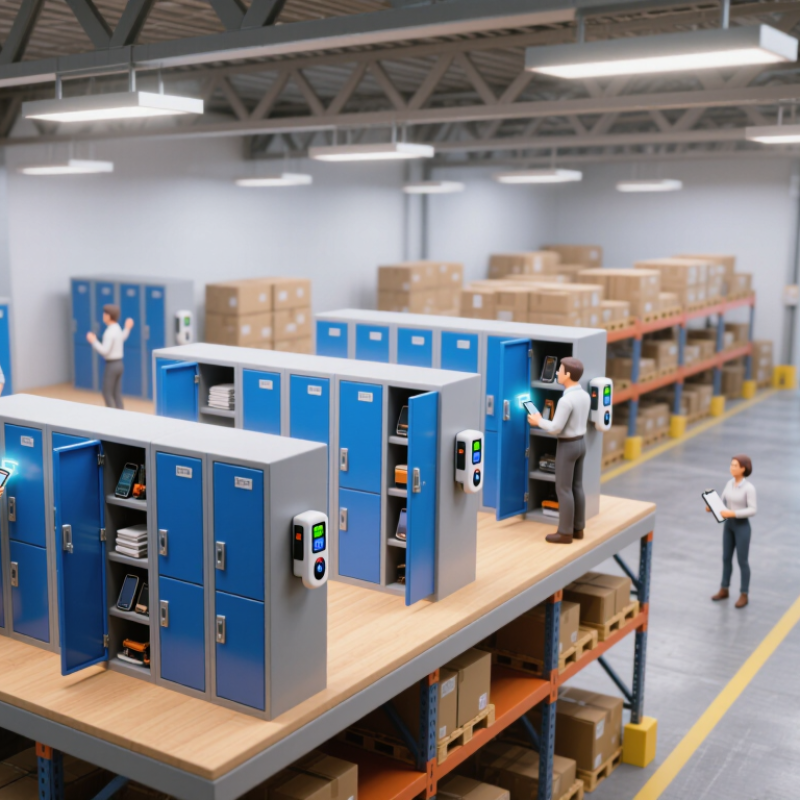
Choosing an RFID locker begins with identifying how your staff will use it daily. Standalone lockers suit small offices with limited connectivity. Networked lockers work better across multiple floors or locations. Parcel-style units support controlled collection and return. Shared-use lockers fit hot-desking environments, while assigned lockers provide stable storage.
Core features deserve close attention. Check the RFID frequency and reader range before purchasing. Metal tools, liquid containers, and crowded compartments can affect reading accuracy. A clear screen helps users confirm access without repeated attempts. Look for audit logs, role-based permissions, remote status checks, and manual override options. The system should also support temporary credentials and easy user removal. Small details matter.
Test the locker with real objects, not empty boxes. Measure door opening time, noise, lighting, and cleaning effort. Confirm that emergency access remains practical during network or power failures. A durable finish helps in busy corridors, but durability can increase weight and installation cost. This trade-off is easy to underestimate. Privacy settings require careful review, especially when access records identify employees. I would run a short pilot before making a full purchase. RFID is useful, but it is not magic. A failed reader, shared credential, or weak mounting point can quickly reduce trust. Reliable support and replaceable components may matter more than a long feature list.
Choosing an RFID locker should begin with daily storage behavior, not appearance. Observe what employees store, when they collect items, and how often compartments turn over. A warehouse may need large bays for equipment, while an office may need smaller spaces for bags and devices. Measure available wall space carefully. Door clearance matters too. I once saw a well-designed locker fail because a nearby cabinet blocked several doors.
Access requirements deserve equal attention. Decide whether users need individual credentials, temporary access, or shared compartments. RFID cards can support quick entry, but credential management must remain simple. Check how administrators add users, revoke access, and review activity records. Security is more than a strong lock. Look for durable doors, protected readers, clear status indicators, and reliable power backup. No system is perfect, so ask what happens during network or power interruptions.
Test the locker during a realistic busy period. Include different users, gloves, weak lighting, and misplaced cards. Confirm that the reader responds consistently. Ask for documented maintenance procedures and response times. Review privacy settings before collecting access data. A pilot installation may reveal problems that a showroom demonstration hides. Leave extra capacity for growth, but avoid paying for empty compartments. Your requirements may change sooner than expected.
How to Choose the Best RFID Locker for Your Business?
RFID technology determines how reliably a locker identifies users and stored items. RAIN RFID, using UHF frequencies, can read multiple tagged items through one door. It suits shared equipment, uniforms, and high-volume returns. However, metal compartments and liquids can reduce read accuracy. Auburn University RFID Lab’s 2023 State of Retail RFID report recorded inventory accuracy near 95% in mature item-level deployments, compared with roughly 60–70% during manual counting. Results vary. Tag placement still matters.
HF RFID and NFC operate at shorter distances, often requiring a user to present one item close to the reader. They offer controlled, deliberate scans and work well for personal storage or high-value equipment. RAIN RFID is faster, but it may identify nearby items accidentally. That trade-off deserves testing. Capacity should follow real usage, not optimistic estimates. For example, 60 compartments with eight daily turnovers create 480 daily transactions. Include spare capacity for seasonal peaks.
Integration can decide whether the locker becomes useful or frustrating. Look for API access, webhook events, single sign-on, audit trails, and connections with inventory or workforce systems. The MHI 2024 Annual Industry Report found that 55% of supply-chain leaders expected increased investment in automation. A locker should therefore share data, not become another isolated screen. Test offline behavior, duplicate reads, and failed network recovery. I would also question impressive pilot results. A clean demonstration is not a busy Monday morning.
Installation costs begin before the first locker arrives. Review network access, power routes, wall strength, and user traffic. A 2023 global warehousing study reported that 73% of decision-makers planned to increase technology investment by 2028. That investment still needs practical site planning. A locker installed beside a loading door may suffer dust, impact, and unstable connections. A short pilot can reveal these problems earlier.
Maintenance requires more than replacing failed readers. Ask about tag-read diagnostics, remote software updates, spare locks, and response times. The 2024 Global Smart Manufacturing Survey found that many manufacturers struggle to convert technology spending into measurable results. That warning matters. A low purchase price can hide frequent service visits, battery replacement, and integration work. I would calculate annual maintenance using real local labor rates, not optimistic estimates.
Total ownership cost should include installation, software, training, energy, repairs, and eventual disposal. Measure labor saved per transaction, not only locker capacity. For example, saving two minutes across 300 daily collections can produce meaningful annual value. However, that estimate may fail during holidays or shift changes. Test normal and peak demand. Keep a five-year spreadsheet, then challenge every assumption with technicians and daily users. Industry studies provide useful benchmarks, but your building creates the final cost.
The cabinet matters, but supplier support determines long-term value. Choose a supplier with proven experience in offices, warehouses, schools, or shared facilities. Their recommendations should match your daily traffic, storage sizes, network conditions, and security requirements.
Ask for clear details about RFID readers, software updates, data protection, installation, training, and replacement parts. A credible supplier should explain system limits without hiding behind technical language. Request customer references from similar environments. Check response times, warranty terms, maintenance coverage, and spare-part availability. A reliable service team can prevent one failed reader from stopping an entire locker area.
Tips: Test a working unit before signing. Scan cards with different user habits. Open several doors repeatedly. Check performance during network interruptions. Confirm whether administrators can manage permissions easily. Ask who handles software faults after installation. Get every service promise in writing.
Long-term value is not simply the lowest purchase price. Cheap hardware can become expensive when batteries, locks, or controllers fail frequently. I have seen projects underestimate installation time and staff training. That mistake is easy to repeat. A better supplier will measure the site, document responsibilities, and provide realistic timelines. Still, no supplier gets everything right. Leave room for review meetings, performance checks, and honest feedback after deployment.