Why Choose a Laser Engraver for Wood?
Wood has a warmth that machines cannot imitate. Its grain, scent, and natural color make every engraved piece slightly different. A laser engraver for wood turns that character into detailed signs, gifts, furniture accents, and creative prototypes. It can trace fine lettering, shaded images, and repeated patterns with impressive consistency. The process also reduces manual cutting and saves valuable workshop time.
However, laser engraving is not a push-button craft. Different woods react differently to heat. Pine may produce dark, uneven marks because of its resin. Birch plywood can reveal attractive contrast, while some sheets may contain adhesives that require careful checking. Experienced users test a small corner before engraving the final surface. They adjust power, speed, focus, and air assistance gradually. Small changes matter.
Precision is only part of the decision. A reliable setup should include proper ventilation, suitable eye protection, and the safety features recommended by the manufacturer. Users should confirm that the selected wood is appropriate for laser processing. Expert guidance from established manufacturers, technical manuals, and experienced woodworkers can prevent costly mistakes. Results still depend on material quality and machine calibration.
That honesty matters. Even a capable machine can leave scorch marks, warped edges, or unclear details. Those flaws are useful feedback, not automatic failure. With patience and careful testing, a laser engraver for wood can become a dependable tool. It supports both practical production and personal expression, while keeping the wood’s natural identity visible.
What a Laser Engraver Is and How It Works on Wood
Why Choose a Laser Engraver for Wood?
What a Laser Engraver Is and How It Works on Wood
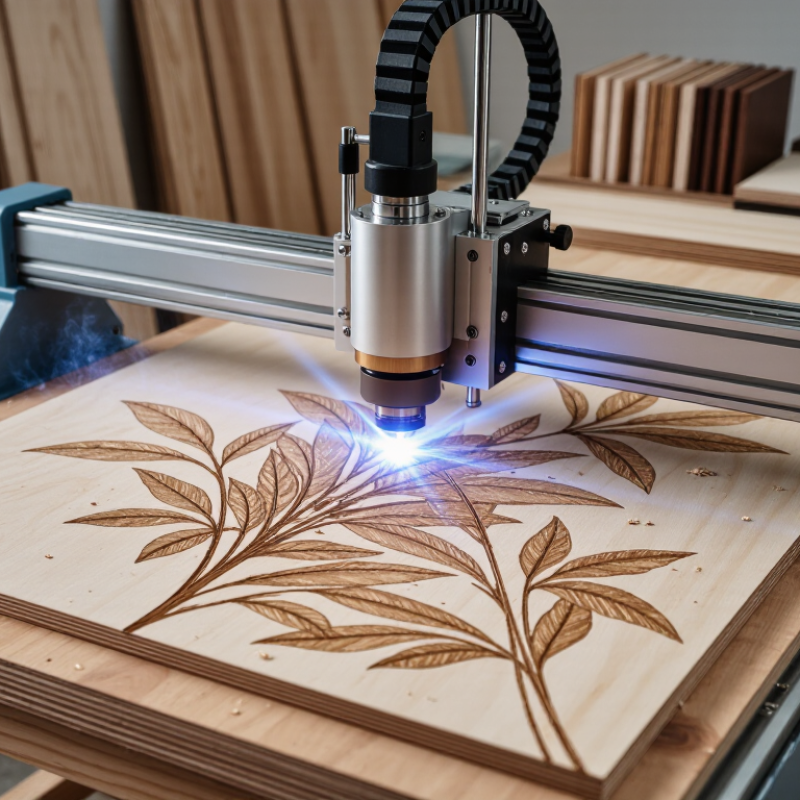
A laser engraver directs a focused beam across a wooden surface. The beam heats, chars, or vaporizes tiny areas along programmed paths. A computer controls movement, speed, and power. This creates lettering, photographs, patterns, and shallow cuts with consistent detail. The process is contactless, so the material receives no pressure from a blade. That matters when working with thin plywood or small decorative parts.
Wood reacts differently according to species, moisture, resin, and grain direction. Soft woods usually mark faster, while dense woods may require slower passes. I have found that a test grid prevents many ruined panels. Still, laser settings are not perfectly predictable. Even two sheets from the same package can produce different shades. Ventilation and careful focus remain essential because burning wood creates smoke and residue.
Industry demand also supports this equipment choice. Grand View Research valued the global laser technology market at approximately USD 17.5 billion in 2023, with continued growth expected through 2030. A 2024 report from MarketsandMarkets similarly identified automation and digital production as major drivers in laser processing. These figures do not guarantee profit for every workshop. They do show expanding interest in precise, computer-guided fabrication. For woodworkers, the practical advantage is repeatability: a saved design can reproduce small signs, engraved boxes, or product samples with limited manual variation. The result can feel personal, although the machine still needs human judgment.
| Data Dimension | What It Means | How It Applies to Wood | Practical Benefit |
|---|---|---|---|
| Laser Engraver Definition | A computer-controlled machine that focuses a concentrated light beam onto a material. | The beam removes or darkens a thin layer of wood according to a digital design. | Produces repeatable text, artwork, patterns, and fine details. |
| Basic Working Process | A design file is converted into movement and power instructions for the laser head. | The laser head moves across the surface while heat chars, vaporizes, or cuts selected areas. | Digital files can be reproduced with consistent positioning and sizing. |
| Common Laser Type for Wood | Carbon-dioxide lasers commonly operate at an infrared wavelength of about 10.6 micrometres. | This wavelength is strongly absorbed by many organic materials, including untreated wood. | Suitable for both engraving and cutting a wide range of wooden sheets and solid wood pieces. |
| Diode Laser Use | Visible or near-infrared diode lasers are available in several output ranges and wavelengths. | They can engrave many light-colored woods and may cut thin wood after multiple passes, depending on optical power and material. | Often useful for compact engraving projects, prototypes, signs, and decorative work. |
| Fiber Laser Suitability | Fiber lasers are designed primarily for materials that absorb their shorter near-infrared wavelength effectively. | Untreated wood is generally not their primary application and may require special coatings or a different process. | Choosing a wood-compatible laser source avoids inefficient processing and inconsistent results. |
| Engraving Result | Engraving removes or thermally darkens the surface without cutting through the entire piece. | Power, speed, focus, wood species, grain direction, and resin content affect darkness and contrast. | Creates detailed graphics, lettering, photographs, logos, and surface textures. |
| Cutting Result | Cutting uses sufficient heat and dwell time to pass through the material. | Thickness, moisture, density, resin, and the number of passes influence whether a clean cut is possible. | Enables production of signs, ornaments, boxes, inlays, models, and craft components. |
| Wood Variables | Wood is a natural material with differences in grain, density, moisture, and color. | Hardwoods, softwoods, plywood, veneer, and medium-density fiberboard can respond differently to identical settings. | Testing a small sample helps establish suitable speed, power, focus, and pass count. |
| Edge Appearance | Heat-based cutting can leave a darker edge than a mechanical saw. | Resin-rich wood and some engineered boards may produce more smoke, residue, or discoloration. | Designers can use the dark edge as a visual feature or reduce it through masking and post-processing. |
| Precision and Detail | The focused beam can create narrow lines and small features when the optics and material are properly aligned. | Fine detail depends on focal-spot size, resolution, material flatness, and the contrast between the mark and the wood. | Supports intricate artwork that may be difficult to reproduce manually. |
| Contact-Free Operation | The laser transfers energy without a cutting tool physically touching the workpiece. | The wood is held in place while the beam performs the marking or cutting operation. | Reduces tool wear and avoids mechanical cutting forces that can move or deform small pieces. |
| Typical Digital Inputs | Laser software can use vector paths and raster images. | Vector paths are generally used for outlines and cuts, while raster images are scanned line by line for engraving. | One machine can handle lettering, line art, photographs, and geometric patterns. |
| Air Assist | Air assist directs a controlled stream of air toward the processing area. | It can help clear smoke and debris and may reduce flare-ups during cutting, when correctly configured. | Improves visibility and can contribute to cleaner, more stable cuts. |
| Ventilation Requirement | Heating wood creates smoke and airborne by-products. | The machine should use suitable extraction and filtration or discharge fumes according to local requirements. | Helps protect indoor air quality and keeps the work area more comfortable. |
| Material Safety | Not every wood product is suitable for laser processing. | Unknown, coated, painted, treated, or adhesive-containing boards may release hazardous fumes; materials containing PVC or vinyl should not be laser processed. | Checking the material composition before use reduces chemical and fire risks. |
| Best Reason to Choose a Laser | Laser processing combines digital control, repeatability, and non-contact thermal marking. | Wood can be engraved or cut with consistent layouts across multiple pieces after settings are tested. | Suitable for personalization, prototyping, signage, crafts, and small-batch production. |
Related Posts
-
The Future of Woodworking with the Best Laser Engraver Technology
-
What is the Best Laser Engraver for Wood Projects?
-
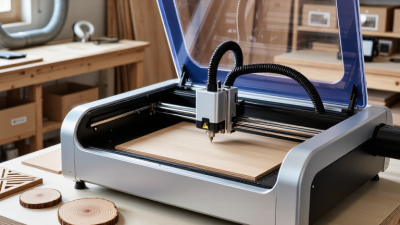
Top Laser Engraver for Wood How to Choose the Best One?
-
Future Market Insights on Best Engraving Machine and How to Choose the Right One for Your Business
-
Digital Insights into the Best CNC Metal Machining Techniques
-
How to Choose the Best CNC Wood Carving Machine: A Comprehensive Tutorial for Buyers
BUSINESSES USING CAMASTER